112 Operator v0.260424-P2P Download

Game Details
- Release name: 112 Operator
- Size: 1.8 GB
- Genre: Indie, Simulation, Strategy
- Developer: Jutsu Games
- Publisher: Games Operators
- Release Date: 23 Apr, 2020
- ALL REVIEWS: Very Positive (2,919)
♂ After reviewing the game, BUY the game to support the developer
https://store.steampowered.com/app/793460/
Screenshots

About This Game
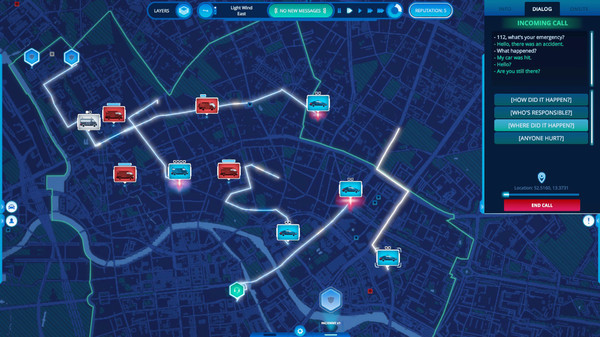
112 Operator is an emergency response and dispatch simulation game where players manage police, fire, and medical units during emergencies across large city maps. Players receive emergency calls, send the correct response teams, manage traffic incidents, handle crimes, and coordinate rescue operations while dealing with changing weather, accidents, and large-scale disasters.
Version 0.260424-P2P includes updated gameplay content, fixes, and performance improvements. The game focuses on real-time decision making, resource management, and crisis coordination while allowing players to control emergency services in different cities using realistic dispatch systems and mission scenarios.
Manage emergency services in any city in the world! Take calls and dispatch rescue forces. Handle difficult situations, now depending on the weather, and traffic. Help the citizens through cataclysms and natural disasters, becoming a better emergency number operator every day!
System Requirements
MINIMUM:
- Requires a 64-bit processor and operating system
- OS: Windows 7 SP1+
- Processor: 2 Ghz
- Memory: 6 GB RAM
- Graphics: NVIDIA GeForce GT 650
- DirectX: Version 10
- Storage: 4 GB available space
How To Install The Game
1) Download the game using a Torrent program or Direct program
2) Extract the game to your preferred location with WinRar or 7-Zip
3) Wait for the extraction to end
4) No need to install the game, just start with the LAUNCHER of the game as administrator
5) Play!
General Notes:
– Make sure you have Spacewar installed. Windows Key + R and type (steam://install/480).
– It is recommended to turn off your antivirus as some files get detected as false positive.
– In the case of an offline game, you may need to block it with firewall to prevent it from going online.
– Do not block the game with firewall if you are playing an online game with your friends.
– Turn Off your AntiVirus and Block the game’s exe in your firewall to prevent the game from
trying to go online ..
– If you install games to your system drive, it may be necessary
to run this game with admin privileges instead
– If you have a vac ban then you won’t able to play online games, create a new account if the account you gonna use have one of those.
-Need Help!! Join our server