Hadean Tactics Moonhunter-TENOKE Download

Game Details
- Release name: Hadean Tactics
- Size: 1.7 GB
- Genre: Indie, Strategy, Early Access
- Developer: Emberfish Games
- Publisher: Emberfish Games
- Release Date: 25 Feb, 2021
- ALL REVIEWS: Very Positive (292)
♂ After reviewing the game, BUY the game to support the developer
https://store.steampowered.com/app/1260590/
Screenshots

About This Game
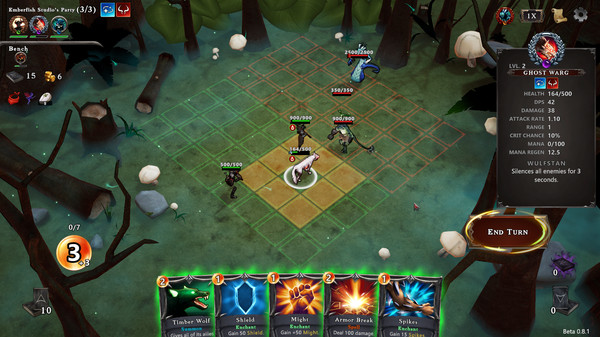
Hadean Tactics: Moonhunter is a roguelike strategy game that combines deck-building mechanics with auto-battler combat in a dark fantasy setting. Players summon units, manage resources, build tactical card combinations, and fight through enemy encounters while progressing across randomly generated runs filled with upgrades, events, and powerful bosses.
The TENOKE release includes the latest version with updated content and gameplay fixes. The game focuses on strategic positioning, unit synergy, spell usage, and run-based progression while allowing players to experiment with different builds, factions, and combat strategies during each playthrough.
Hadean Tactics is a roguelike deckbuilding game fused with autobattler elements to create a unique strategy experience. Use your cards to influence the actions of your units and help your Hero defeat the Six Wings of Hell!
System Requirements
MINIMUM:
- OS: Windows 7 or newer
- Processor: Dual core from Intel or AMD at 2.8 GHz
- Memory: 4 GB RAM
- Graphics: nVidia GeForce 8600/9600GT, ATI/AMD Radeon HD2600/3600
- DirectX: Version 11
- Storage: 4 GB available space
- Additional Notes: Version 9.0c
How To Install The Game
1) Download the game using a Torrent program or Direct program
2) Extract the game to your preferred location with WinRar or 7-Zip
3) Wait for the extraction to end
4) No need to install the game, just start with the LAUNCHER of the game as administrator
5) Play!
General Notes:
– Make sure you have Spacewar installed. Windows Key + R and type (steam://install/480).
– It is recommended to turn off your antivirus as some files get detected as false positive.
– In the case of an offline game, you may need to block it with firewall to prevent it from going online.
– Do not block the game with firewall if you are playing an online game with your friends.
– Turn Off your AntiVirus and Block the game’s exe in your firewall to prevent the game from
trying to go online ..
– If you install games to your system drive, it may be necessary
to run this game with admin privileges instead
– If you have a vac ban then you won’t able to play online games, create a new account if the account you gonna use have one of those.
-Need Help!! Join our server