Beat Hazard 3 v1.051 Download

Game Details
- Release name: Beat Hazard 3
- Size: 1.8 GB
- Genre: Action, Casual, Indie
- Developer: Cold Beam Games
- Publisher: Cold Beam Games
- Release Date: 16 Oct, 2019
- ALL REVIEWS: Very Positive (1,047)
After reviewing the game, BUY the game to support the developer
https://store.steampowered.com/app/618740/
Screenshots

About This Game
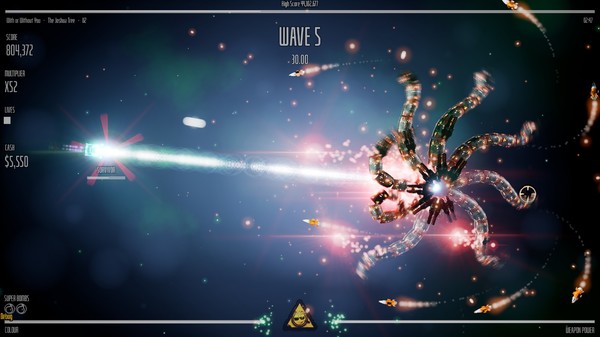
Beat Hazard 3 is a music-driven twin-stick shooter that turns your personal music collection into the foundation of the gameplay experience. Every song generates unique levels, enemy patterns, visual effects, and combat intensity, meaning no two battles play out exactly the same way. Players pilot a heavily armed spacecraft through waves of enemies while the rhythm, energy, and structure of the music directly influence what happens on screen. The result is a shooter that feels different depending on whether you’re listening to a calm soundtrack, a fast electronic track, or a heavy rock song.
The core gameplay combines classic arcade shooting mechanics with procedural generation powered by music analysis. As a song plays, enemy spawns, attack patterns, and visual effects react in real time to the audio. Louder sections create more intense combat, while quieter moments offer brief opportunities to recover and reposition. Players collect power-ups, upgrade weapons, and unleash devastating attacks while trying to survive increasingly difficult waves of enemies. The controls remain simple and accessible, but mastering movement, weapon management, and enemy patterns becomes important during higher difficulty levels.
Version 1.051 includes gameplay improvements, bug fixes, and performance optimizations that refine the overall experience. Earlier versions already offered strong music integration, but recent updates improve visual responsiveness, weapon balancing, and stability during larger battles. Performance during songs with complex audio structures has also been improved, helping maintain smooth gameplay even when the screen fills with enemies, projectiles, and particle effects. These updates make the connection between music and gameplay feel more responsive and consistent.
One of the biggest strengths of Beat Hazard 3 is replay value. Because the game can use different music tracks, players effectively have access to endless variations of levels and encounters. The game also supports online music integration, expanded customization options, and multiple gameplay modes that encourage experimentation. Players can test how different genres affect gameplay and discover which songs create the most exciting battles.
The visual presentation is another highlight. Bright explosions, reactive lighting effects, and colorful particle systems create a spectacle that moves in sync with the music. Despite the amount of action happening on screen, important gameplay information remains readable. The soundtrack-driven effects add energy to every battle without making the game difficult to follow.
Experience your music collection as never before with this intense music driven arcade shooter. Each of your songs will have its own unique ebb and flow based on the music.
Who Should Play It?
Beat Hazard 3 is a great choice for players who enjoy arcade shooters, rhythm-based experiences, and games with strong replay value. Fans of twin-stick shooters and music-driven gameplay will likely appreciate how every song creates a different challenge. Players who enjoy combining their own music collection with gameplay mechanics will find plenty to explore.
System Requirements
MINIMUM:
- OS: Windows Vista, 7, 8, 10
- Processor: 2.5GHz processor
- Memory: 512 MB RAM
- Graphics: Nvidia GeForce GTX 670
- Network: Broadband Internet connection
- Storage: 250 MB available space
How To Install The Game
1) Download the game using a Torrent program or Direct program
2) After downloading the game, go to the downloaded game folder
3) Extract the files with WinRar or 7-Zip
4) Now start the installation with ” Setup.exe “, choose the directory to install
5) Wait until the installation is complete
6) Now just start the game as an administrator with the shortcut that was created on the desktop
7) Play!
Download The Game
Important: This is not an official release of the game developer. Please after the test, buy game from the developer for the best experience.